
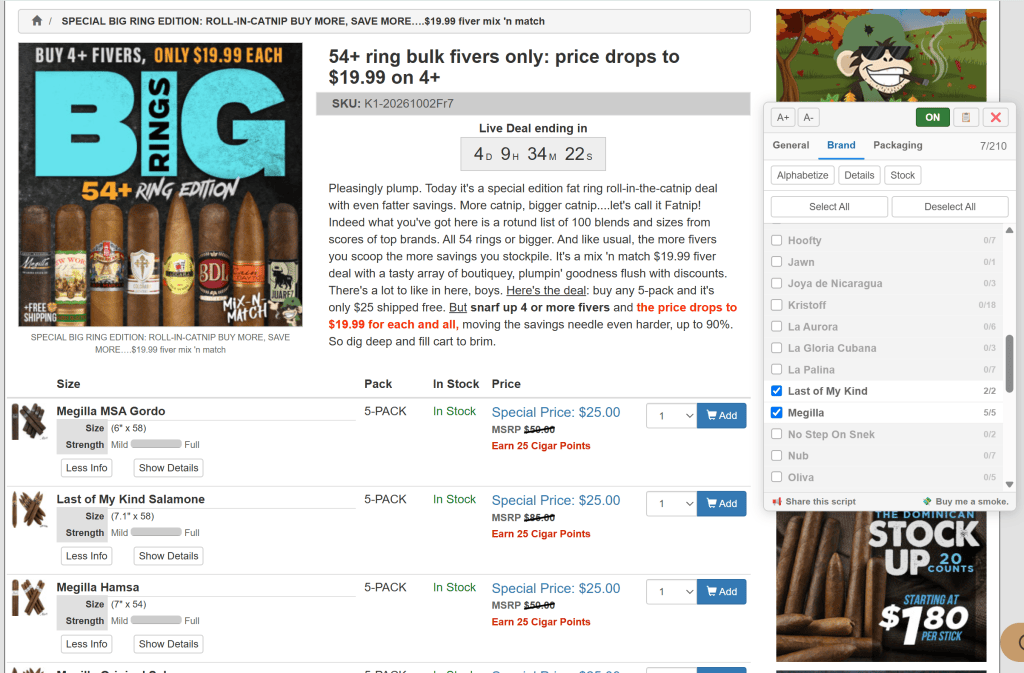
If you shop at Cigar Page, you know how long some of their deal pages can get. There might be something you want buried in there, but finding it means scrolling past dozens of cigars, pack sizes, and brands you have no interest in buying.
I recently discovered a great little tool that makes those pages much easier to browse: CigarPage Multi-Filter for Google Chrome, created by GitHub user Shmshka. It’s free and open-source, and it adds a floating filter panel to Cigar Page’s product listings.
You can narrow a page by price, ring gauge, length, brand, and packaging. Looking for a particular size in a five-pack? Set your dimensions, select the packaging, and the list shrinks to what fits. You can also hide sold-out items, alphabetize the products by brand and name, and expand product details right on the page.
The brand controls are particularly useful. Along with checking and unchecking brands, you can right-click one to focus on it or hide it across future visits. There’s even a “Hide When Not Bundled” option, which lets you skip a brand’s individual offerings while keeping mixed samplers that include other brands. Related lines are grouped under their parent house, so ACID and Deadwood, for example, fall under Drew Estate.
There’s also a feature for those “secret sales” where the discounted price only appears after you put something in your cart. On sale pages that have already been decoded and added to the project’s files, the tool can display the verified cart prices alongside the crossed-out listed prices. The button appears when that pricing is available for the page you’re browsing.
One detail to keep in mind: the price filter works from the listed price of the package. It doesn’t calculate the cost per cigar, and displaying the secret-sale price doesn’t change what the filter uses.
Installation takes two steps:
- Install a userscript manager such as Tampermonkey or Violentmonkey in your browser.
- Open the CigarPage Multi-Filter userscript and click Install.
I installed Tampermonkey and it installed without a hitch. After installing the userscript, the panel didn’t automatically pop up, so I had to adjust some settings in Chrome to allow the userscript to run. Tampermonkey will let you know which setting to adjust.
Once installed, the panel appears on supported Cigar Page listings. You can drag it where you want it and adjust its text size. It remembers your permanent brand exclusions and panel preferences, while the temporary filters start fresh when you load another page.
You can also copy the filtered cigar list, which is handy if you want to save a shortlist before deciding what to buy.
The most powerful way I found to use this tool is to press the Deselect All button to clear the list. Then I’ll scroll through the list of brands and select the one(s) I want to look at. Also, when my good buddy Katman posts a deal, then says you’ve got to scroll down to about the middle of the list, you no longer have to do that. Just deselect all the items, then click on the brand. Filtering is instantaneous and it has saved me TONS of time!
I wanted to pass this along because digging through Cigar Page’s deals is something a lot of us do. Being able to narrow those pages to the cigars we’re actually interested in makes the whole process easier.
You’ll find the script, instructions, and illustrated walkthrough on the project’s GitHub page. And if you find it useful, the developer has a “Buy Me a Smoke” link there, too.






Leave a comment